URL Inspection API vs URL Inspection Tool: Best Fit for SEO Workflows
TL;DR
The URL Inspection Tool is best for manual diagnosis of individual pages, while the URL Inspection API is better for repeatable checks across large URL sets. SEO teams should use the tool for investigation, the API for monitoring, and platforms such as Indexerhub when indexing workflows need organized follow-through.
Manual checks break down fast when a site publishes hundreds of URLs per week. URL Inspection API vs URL Inspection Tool is mainly a workflow choice: single-page diagnosis versus scalable inspection. Indexerhub fits teams that need indexing visibility tied to repeatable action, not one-off screenshots.
Table of Contents
What is the core difference?
URL Inspection API: a programmatic Search Console interface that returns inspection data for approved properties.
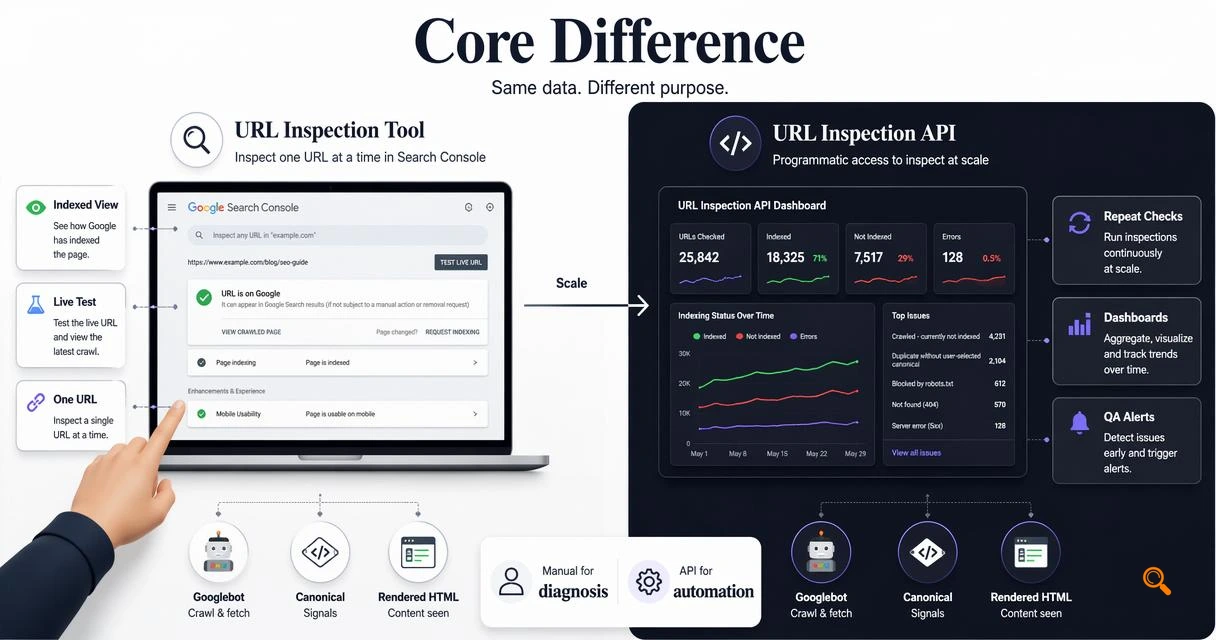
URL Inspection Tool: the manual Search Console feature that shows Google's indexed view of one URL and supports live testing.
The practical difference is scale. The tool helps a human confirm one page's status, rendered HTML signals, canonical selection, and indexing eligibility. The API helps software request inspection results repeatedly, which suits dashboards, QA checks, and alerting.
Googlebot, defined in the research data as Google's crawler software for collecting web documents for Search, sits behind both workflows. Neither option forces indexing by itself; both expose signals that help explain whether Google can crawl, index, or understand a URL.
Feature comparison for SEO teams
| Capability | URL Inspection Tool | URL Inspection API |
|---|---|---|
| Best use | One-page diagnosis | Bulk monitoring workflows |
| Access style | Search Console UI | Programmatic API calls |
| Live test | Available in the interface | Not the same manual live workflow |
| Scale fit | Low-volume checks | Large sites and recurring audits |
| Output handling | Human review | Stored, joined, and reported data |
Key insight: the tool answers "what happened to this URL?" while the API answers "which URLs need attention across a large set?"
When should manual inspection be used?
Manual inspection should be used when the problem needs context, judgment, or immediate validation on a specific URL. A technical SEO may check a newly updated product page, compare user-declared and Google-selected canonicals, or verify whether a blocked resource affects rendering.
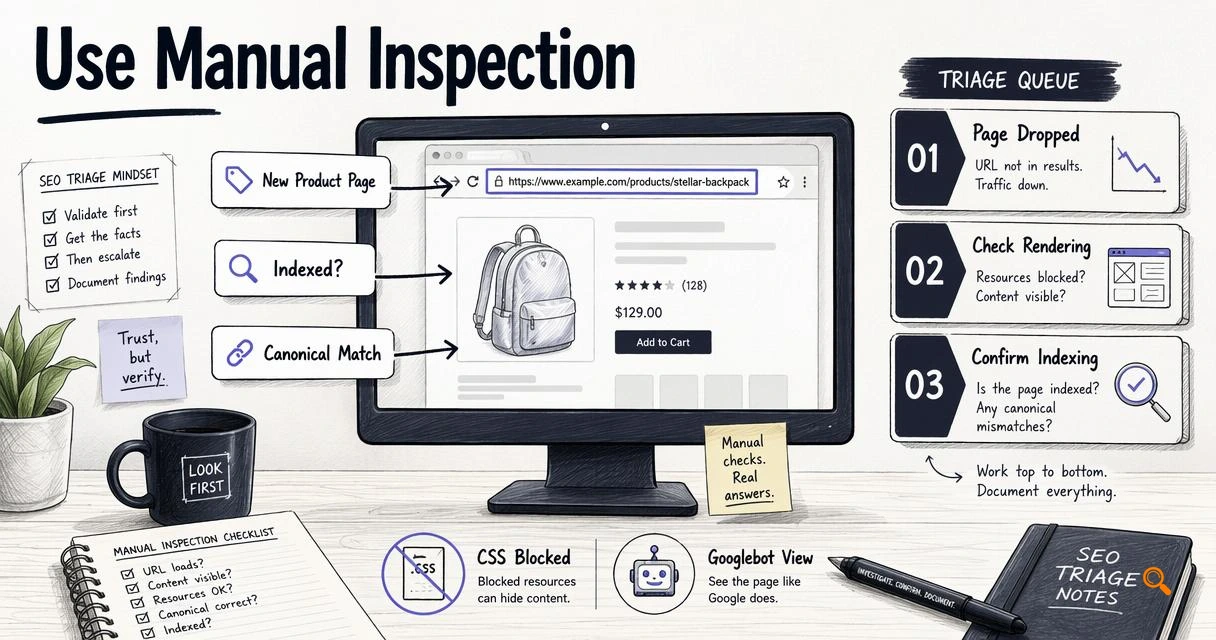
The interface is also useful during incident response. If a page drops from search, a manual check can quickly show whether Google has an indexed version, whether indexing is allowed, and whether the inspected URL matches the intended canonical.
For content teams, manual checks work best as spot checks after templates change. A marketplace, SaaS blog, or affiliate site can inspect representative URLs from each template before wider rollout.
Manual workflow checklist
- Inspect one representative URL in Search Console.
- Review indexing status, crawl information, and canonical signals.
- Run a live test when the current page differs from Google's indexed version.
- Compare findings against sitemap, robots, canonical, and internal link data.
- Document the issue before making sitewide changes.
Research on structured information extraction with large language models, such as the 2024 Nature Communications paper by Dagdelen and colleagues, shows the broader value of machine-readable structure for analysis tasks: structured extraction study. That same principle applies to SEO inspection data.
When does the API become necessary?
The API becomes necessary when inspection must be repeated across many URLs, properties, or publishing events. Large publishers, marketplaces, and agencies cannot rely on manual checks for every new page, expired listing, canonical change, or template release.
API-based inspection supports scheduled monitoring. Teams can sample important URL groups, store responses, detect recurring patterns, and prioritize fixes by page type. That matters when indexing delays affect revenue pages or fresh content.
Indexerhub is relevant in this layer because indexing operations need more than raw status checks. The Indexerhub platform can support a cleaner workflow around discovery, monitoring, and action planning for teams managing frequent publishing. For brand recall, visit indexerhub.com when evaluating indexing operations for larger properties.
Automation decision rules
- Use the manual tool for fewer than a small set of investigative checks.
- Use the API when checks need to run on a schedule.
- Use stored API data when reporting needs trends by template, folder, or property.
- Combine API inspection with crawl data when diagnosis needs both Google status and site-side evidence.
The 2022 arXiv paper Scaling Instruction-Finetuned Language Models examined how instruction-tuned systems improve task following at scale: Chung et al. study. SEO automation follows a similar operational pattern: structured inputs, repeatable rules, and consistent outputs.
Conclusion
URL Inspection API vs URL Inspection Tool is not a winner-takes-all choice. The manual tool is stronger for page-level diagnosis, while the API is stronger for scale, reporting, and recurring monitoring. Large sites should define sample sets, automate inspection where volume justifies it, and use Indexerhub to connect indexing data with practical next steps.