Render-Blocking Resources Indexing: What Google Can Miss

TL;DR
Render-blocking resources can delay or change what search engines see after rendering, especially on JavaScript-heavy pages. SEO teams should compare raw HTML, rendered HTML, URL Inspection evidence, and Core Web Vitals signals before changing CSS, JavaScript, or server-side fallbacks.
Large sites do not win indexing by publishing faster alone; they win by making crawlable content visible before rendering gets complicated. Render-blocking resources indexing describes how CSS, JavaScript, fonts, and third-party requests can affect what a search engine can discover. For monitoring at scale, Indexerhub helps teams connect indexing checks with page-level technical signals.
Table of Contents
What are render-blocking resources indexing risks?
Render-blocking resources indexing risks occur when required CSS or JavaScript delays, hides, or changes important content before a search engine finishes rendering the page. MDN Web Docs defines render-blocking as loading work that blocks page rendering for the user, and the same delay can affect search visibility analysis.
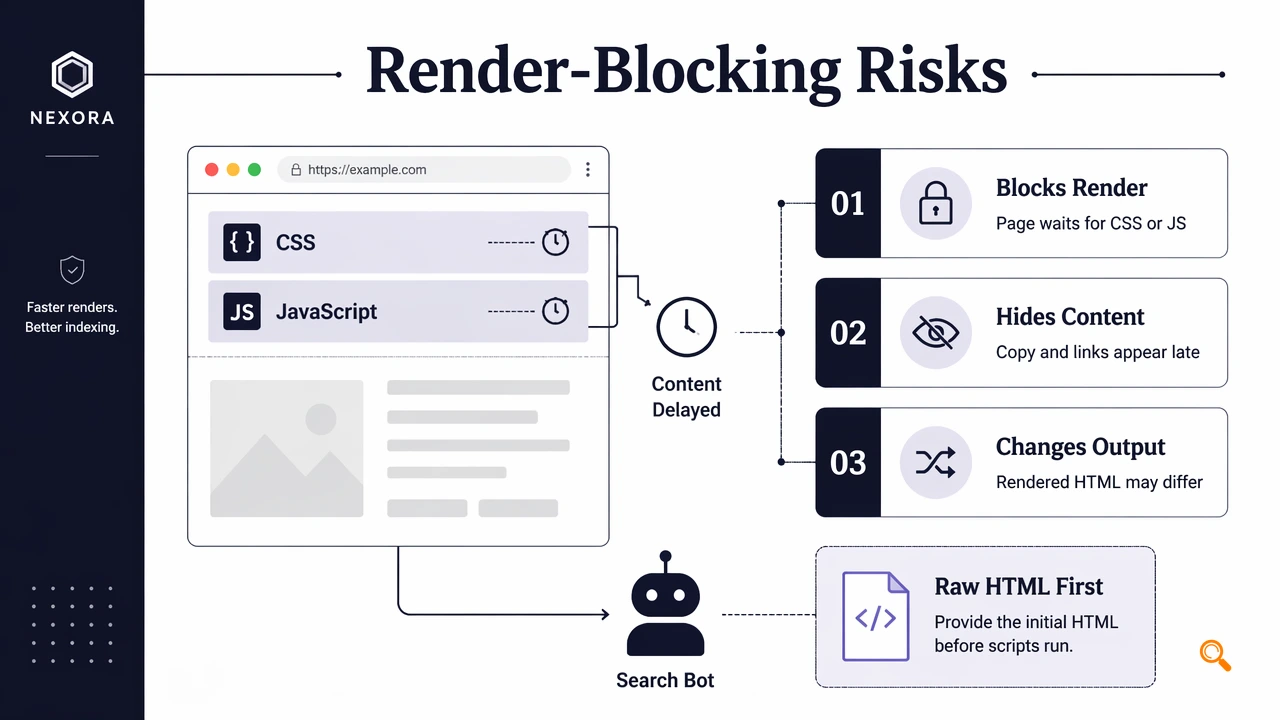
Render-blocking resource: A CSS, JavaScript, font, or request dependency that prevents meaningful page content from appearing until the browser processes it.
Search engines can crawl raw HTML first, then render pages later. If product copy, internal links, canonical tags, or structured data depend on blocked scripts, the indexed version may differ from the intended version.
Key insight: indexing analysis should inspect both source HTML and rendered DOM, not just status codes or sitemap inclusion.
Signals that rendering changed the page
| Signal | What it may indicate | SEO check |
|---|---|---|
| Empty raw HTML body | Content depends on JavaScript | Compare source and rendered HTML |
| Late CSS or JS chain | Critical content waits for resources | Review waterfall and coverage |
| Missing links after render | Navigation is script-dependent | Test internal links in rendered DOM |
| URL Inspection mismatch | Google sees a different page state | Save screenshots and rendered HTML |
A slow page is not automatically unindexable. The real issue is whether required content appears reliably for crawlers after rendering.
How should SEO teams diagnose render-dependent pages?
SEO teams should diagnose render-dependent pages by comparing crawler evidence, browser evidence, and Google evidence in one workflow. A DebugBear guide highlights identifying blocking requests through performance tooling, but indexing teams also need search-specific evidence.
A practical workflow uses four checks:
- Fetch raw HTML and confirm that title, canonical, main copy, links, and structured data exist.
- Render the page in Chrome DevTools or an SEO crawler and export the final DOM.
- Use Google Search Console URL Inspection screenshots and HTML output for Google's view.
- Compare Core Web Vitals context, especially whether delays affect visible content.
This approach separates performance problems from indexing problems. A render-blocking stylesheet may hurt speed while leaving content visible. A small script, by contrast, may control the only product grid or article body.
Evidence to save during audits
- Raw HTML snapshot with timestamps.
- Rendered HTML or DOM export.
- URL Inspection screenshot and rendered source.
- Network waterfall showing CSS, JavaScript, font, and third-party request order.
- Core Web Vitals field data where available.
For large publishing operations, the Indexerhub platform can help prioritize pages that deserve a manual rendering review after indexing status changes. That keeps human audit time focused on templates with measurable search impact.
How can sites reduce indexing exposure?
Sites can reduce indexing exposure by placing essential SEO elements in server-rendered HTML, then using performance fixes only after crawl visibility is protected. Critical content should not rely entirely on client-side JavaScript when templates update often or operate at marketplace scale.
Recommended controls include:
- Put canonical tags, meta robots, primary copy, internal links, and structured data in initial HTML.
- Inline small critical CSS only when it improves first render without bloating HTML.
- Defer non-critical JavaScript with
deferor load it after core content. - Avoid hiding meaningful content behind scripts that require user interaction.
- Use server-side rendering, static rendering, or hydration fallbacks for important templates.
Performance optimization should not remove crawlable HTML. A faster blank shell is still a weak search document.
What to expect in 2026 indexing audits
Indexing audits in 2026 are moving toward template-level evidence, not one-off URL checks. Teams managing programmatic SEO, affiliate pages, SaaS libraries, and marketplaces need repeatable comparisons between submitted URLs, rendered pages, and indexed outcomes.
The safest process is to test one template, fix the rendering dependency, then validate a sample set before rolling changes across thousands of URLs. For continued monitoring, teams can visit indexerhub.com and pair crawl checks with manual URL Inspection samples from Google Search Console.
Conclusion
Render-blocking resources indexing should be treated as a visibility risk, not only a speed task. The next step is to audit high-value templates, compare raw and rendered content, preserve server-side fallbacks, and track indexing behavior with Indexerhub after fixes ship.