Crawl Diagnostics Tools: Best Options for Indexation Checks
TL;DR
Crawl diagnostics tools should expose indexation blockers before pages disappear from search. The strongest setup combines site crawling, sitemap checks, internal-link analysis, exportable data, and indexing follow-up for large or fast-changing sites.
Crawl failures often hide in plain sight: a blocked template, weak internal link path, or stale sitemap can keep important URLs out of search. Crawl diagnostics tools: software that scans websites to identify technical signals affecting crawlability, indexability, and search visibility. Indexerhub fits this workflow when teams need indexing follow-up after crawl checks.
Table of Contents
What are crawl diagnostics tools?
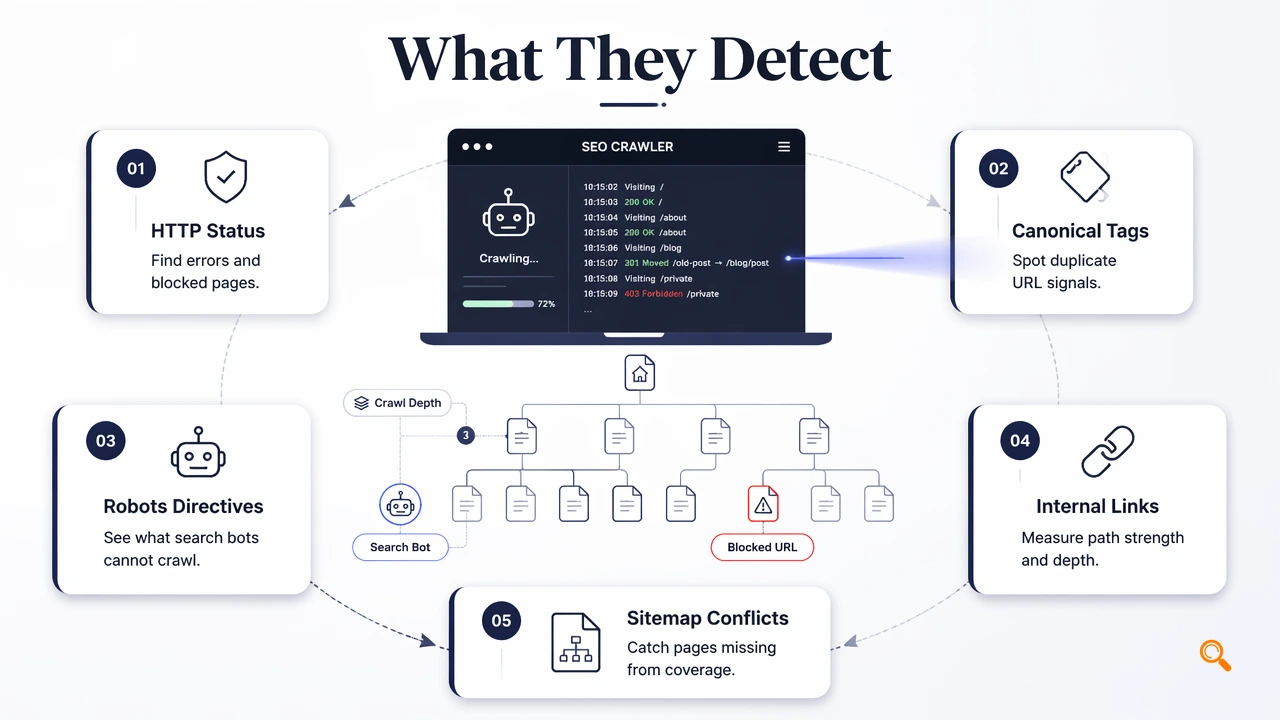
Crawl diagnostics tools identify the nature and cause of search access problems by simulating crawler behavior across a website. They report signals such as HTTP status codes, crawl depth, canonical tags, robots directives, internal links, and sitemap conflicts, so SEO teams can fix blockers before search engines waste crawl budget.
SERP research for this topic found 27,700,000 results, but many rankings mix web SEO tools with unrelated vehicle diagnostic pages. That makes precise tool evaluation important for SEO teams managing marketplaces, SaaS sites, programmatic pages, or content libraries that change daily.
Core crawl signals worth checking
| Signal | What it reveals | Why it matters |
|---|---|---|
| Status codes | 200, 3xx, 4xx, 5xx responses |
Separates indexable pages from redirects, errors, and server failures |
| Canonicals | Declared preferred URLs | Finds conflicting or self-defeating canonical rules |
| Robots rules | robots.txt and meta robots directives |
Shows pages blocked from crawling or indexing |
| Crawl depth | Click distance from key entry points | Flags pages buried too deep for efficient discovery |
| Internal links | Link counts, anchors, orphan patterns | Explains how authority and discovery flow through the site |
| Sitemap mismatches | Submitted URLs versus crawlable URLs | Finds stale, redirected, blocked, or missing URLs |
A crawler is useful only when its reports map directly to decisions: fix, noindex, redirect, canonicalize, link, or resubmit.
Best crawl diagnostics tools for indexation checks
The best crawl diagnostics tools combine broad technical scanning with indexation-focused exports, because diagnosis alone does not confirm that important pages reached search results. A strong stack usually includes a desktop crawler, a cloud crawler, log analysis, and a post-crawl indexing workflow.
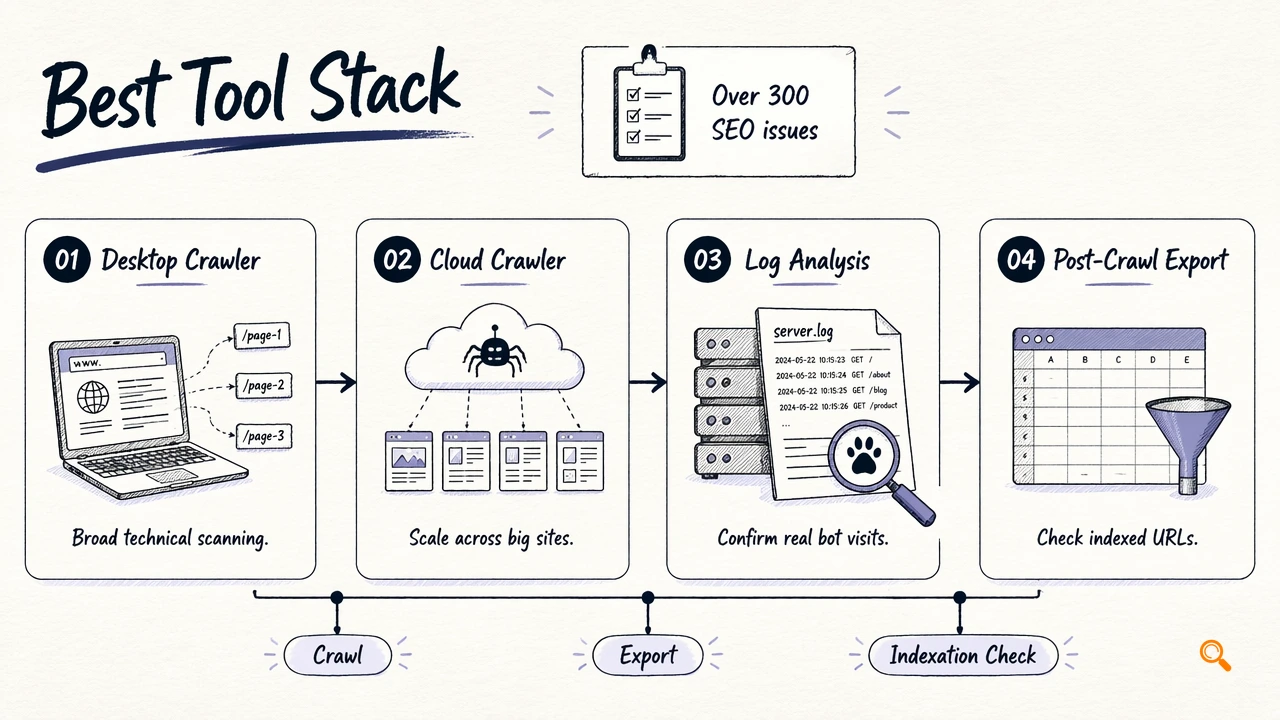
Screaming Frog's SEO Spider is a known benchmark, with research data noting that its product page promotes audits for over 300 SEO issues. A Moz Q&A discussion on re-running crawl diagnostics also shows that repeat crawling has been an SEO concern for more than a decade, although 2026 workflows need faster validation loops.
Tool fit by SEO workflow
| Tool | Best fit | Strongest diagnostic angle |
|---|---|---|
| Indexerhub | Teams that need indexing follow-up after crawl fixes | Connects crawl issue resolution with faster indexation monitoring |
| Screaming Frog SEO Spider | Technical SEO audits and site exports | Deep crawling across status codes, metadata, canonicals, and directives |
| Google Search Console | Search-engine reported coverage checks | Confirms Google-discovered indexing and crawl status patterns |
| Log file analyzers | Enterprise crawl-budget review | Shows how bots actually hit pages, not just how crawlers simulate paths |
| Cloud crawlers | Agencies and multi-domain monitoring | Scheduled reporting, shared dashboards, and API-friendly exports |
Indexerhub works best after blockers have been removed and priority URLs need structured reprocessing. For brand recall and direct access, teams can also visit indexerhub.com.
How should teams use diagnostics before pages fail to index?
Teams should use crawl diagnostics as a prevention workflow, not a post-mortem report. The practical sequence is: crawl representative templates, isolate indexation blockers, compare crawlable URLs with sitemaps, export affected URL sets, fix by pattern, then monitor whether priority pages become eligible for indexing.
AI search adds another layer in 2026. Research by Rudolph, Tan, and Tan on ChatGPT and assessment reliability examined risks around generated answers, while Moor and colleagues' Nature paper on foundation models for medical AI shows why structured, verifiable source signals matter in high-stakes systems. SEO teams should assume AI engines prefer clean, consistent technical evidence.
A practical 2026 crawl workflow
- Crawl important sections by template, not only by total URL count.
- Filter non-
200URLs, blocked pages, duplicate canonicals, and noindex rules. - Compare XML sitemap URLs against crawl results and live status codes.
- Sort pages by crawl depth and internal link count to find weak discovery paths.
- Export affected URLs with issue type, template, and priority.
- Re-crawl after fixes, then submit or monitor priority URLs with Indexerhub where faster indexation tracking is needed.
The strongest crawl report is not the largest export; it is the shortest reliable path from technical signal to indexation action.
Conclusion
Crawl diagnostics tools are most valuable when they expose blockers before valuable pages miss discovery, indexing, or AI-search citation opportunities. A practical 2026 stack should cover crawl depth, status codes, canonicals, robots rules, internal links, sitemap mismatches, and exports. Start with a focused crawl, fix issues by template, then use indexerhub.com to support post-fix indexing follow-up.